how browser builds and runs a web page
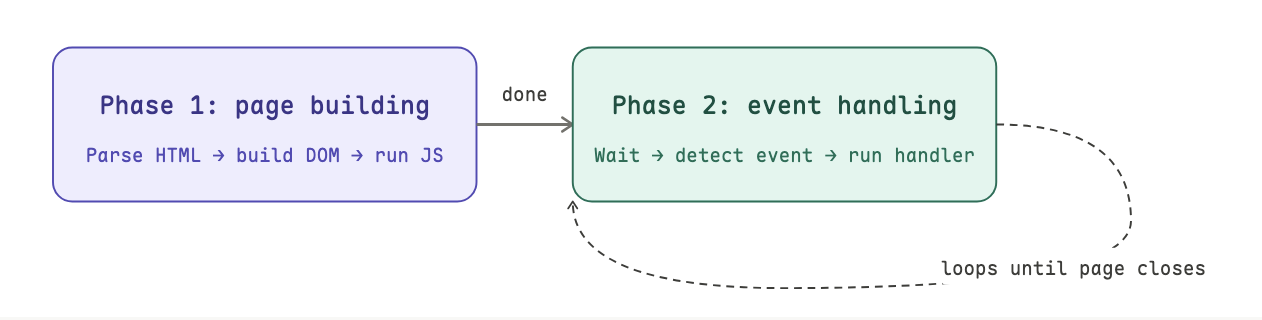
when you open a web page, the browser receives the HTML and does two things in order:
- build the page - read the HTML, construct a model of the page in memory, and run JavaScript it finds along the way.
- handle events - wait in a loop for things to happen (clicks, mouse moves, server responses), then run the right code when they do.
that is the lifecycle, everything else is detail inside those two phases.
phase 1 - building the page
the browser needs a model of the page
HTML is just text. the browser can't work with raw text. it needs a structured, living representation of the page that JavaScript can query and modify. that structure is called the DOM (Document Object Model).
think of the DOM as a family tree. every HTML element is a node. elements nest inside each other, forming parent-child relationships. siblings are elements at the same level with the same parent.
html
├── head
│   ├── title
│   └── style
└── body
    ├── ul#first
    └── script
one important thing: the DOM and the HTML file are not the same thing. the HTML is the blueprint. the DOM is what the browser actually builds from it and the browser will silently fix errors along the way. for example, if you put a <p> tag inside <head> (which is invalid), the browser moves it to <body> without complaining.
JavaScript runs whenever the browser hits a <script> tag
the page-building process isn't just "read HTML from top to bottom." it alternates:
- parse HTML → add nodes to the DOM
- hit a
<script>tag → pause HTML parsing, run the JavaScript - JavaScript finishes → resume HTML parsing
- repeat until there's no more HTML

what JavaScript can (and can't) do during page building
JavaScript runs inside a sandbox that the browser provides. the key entry point is the window object — a global object that gives JS access to everything: the DOM via window.document, browser APIs, and any global variables you create.
during page building, JavaScript can do quite a lot:
- read any DOM element that already exists (was parsed before the
<script>tag) - create new elements and insert them into the DOM
- modify or delete existing elements
- register event handlers, functions to run later when something happens
there's one important constraint: JavaScript can only touch elements that have already been parsed. if your <script> is halfway down the page, elements below it don't exist in the DOM yet. this is why developers often put <script> tags at the bottom of <body> so by that point, the entire DOM exists and is safe to query.
two types of JavaScript code
// GLOBAL CODE, runs immediately, line by line, as the browser encounters it
var list = document.getElementById("first");
addMessage(list, "Page loading");

// FUNCTION CODE, defined here, but only runs when called
function addMessage(element, message) {
  var item = document.createElement("li");
  item.textContent = message;
  element.appendChild(item);
}
global code executes automatically in sequence. function code only runs when something calls it.
phase 2 - event handling
JavaScript is single-threaded, so only one piece of code running at any given moment. the browser queues events up and processes them in order.
this is called the single-threaded execution model. it simplifies a lot of things (no race conditions, no concurrent mutation), but it has a consequence: if your event handler takes a long time to run, the entire page freezes until it finishes.
the event queue
all events go into a single event queue as they arrive. the browser's event loop continuously checks this queue and runs the handler for each event when it reaches the front.
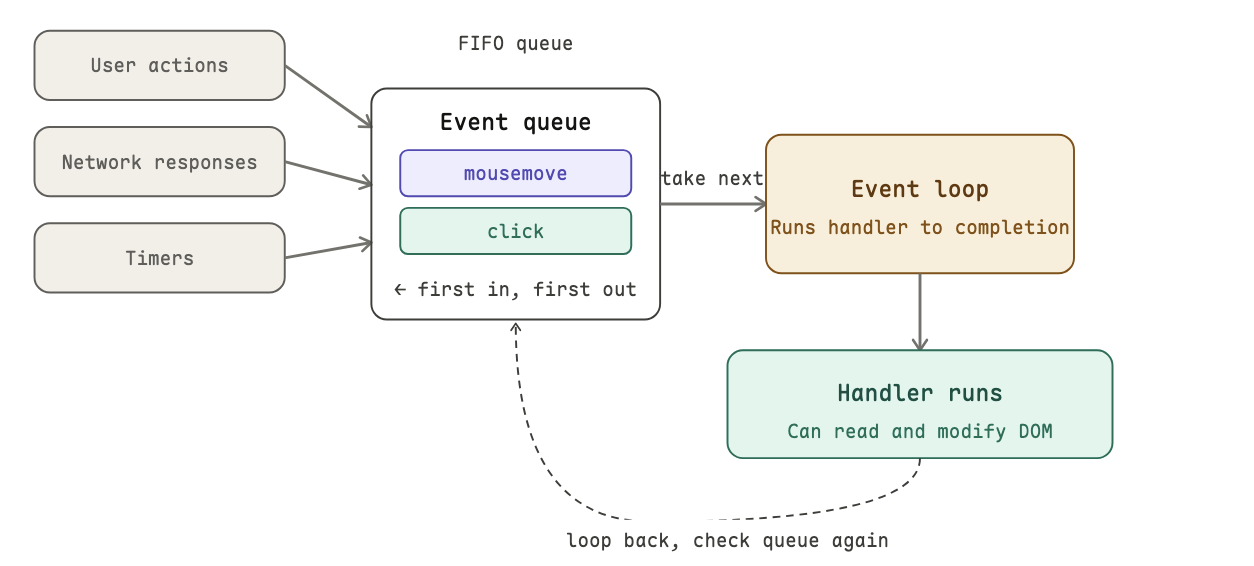
the event loop does three things, forever:
- check the front of the queue. Is there an event?
- if yes — take it, run its handler all the way to completion. Nothing else runs meanwhile
- go back to step 1
events don't interrupt each other but wait in line. this is why a handler that runs for a long time (say, a heavy loop) will make your page feel frozen.
registering event handlers
the browser can respond to an event by registering a handler for it.
two ways of registration:
- property assignment -
element.onclick = function() {}. simple, but limited: you can only assign one handler per event this way. a second assignment overwrites the first. - addEventListener -
element.addEventListener("click", function() {}). the preferred approach. you can attach as many handlers as you need for the same event, and none of them overwrite each other.
events are asynchronous
asynchronous means you don't know when it will happen. it is not predictable. so event handlers are defined in advance and the browser calls them whenever the triggering event occurs.
the four main event categories:
- browser events, page finished loading, page about to close
- network events, server responded to an Ajax request
- user events, mouse click, mouse move, key press
- timer events,
setTimeoutorsetIntervalfired
understanding by example
here is a concrete walktrough with a simple app.
<ul id="first"></ul>

<script>
  function addMessage(el, msg) {
    var item = document.createElement("li");
    item.textContent = msg;
    el.appendChild(item);
  }
  var first = document.getElementById("first");
  addMessage(first, "Page loading");   // runs NOW (global code)
</script>

<ul id="second"></ul>

<script>
  document.body.addEventListener("mousemove", function() {
    addMessage(document.getElementById("second"), "Event: mousemove");
  });
  document.body.addEventListener("click", function() {
    addMessage(document.getElementById("second"), "Event: click");
  });
</script>
what happens, step by step:
- browser parses
<ul id="first">→ adds aulnode to the DOM - browser hits
<script>→ pauses HTML parsing, runs JS:- defines
addMessage(stored in memory, not run yet) - calls
document.getElementById("first")→ finds theulnode - calls
addMessage(...)→ creates a<li>Page loading</li>and inserts it into the DOM
- defines
- JS finishes → browser resumes HTML parsing
- browser parses
<ul id="second">→ adds it to the DOM - browser hits second
<script>→ runs JS:- registers a
mousemovehandler ondocument.body - registers a
clickhandler ondocument.body
- registers a
- no more HTML → page building complete
- event handling begins. the browser loops, watching the event queue.
- user moves mouse →
mousemoveevent enters queue → loop picks it up → runs the handler →"Event: mousemove"appears in#second - user clicks →
clickevent enters queue → loop picks it up →"Event: click"appears in#second - loop continues until the page is closed