React state management
when managing state, start simple. most state doesn't need a library and React's built-in hooks can handle 80% of cases. only scale up only when the complexity requires you to.
the five types of state
before picking a solution, identify what kind of state you're dealing with. each type has its suitable use cases.
| type | what it is | tool |
|---|---|---|
| local | component-specific data (toggles, form inputs) | useState / useReducer |
| shared | data needed across nearby components | lifted state / Context |
| global | app-wide data (auth, cart, theme) | Context + Reducer / Zustand |
| remote | API data — lives on a server, can go stale | TanStack Query |
| URL | filters, pagination, tabs | nuqs / router params |
the rest of this guide moves through each tier, building on the one before it.
case 1 - a feature with local state
scenario: you're building a simple counter, a toggle, or a form field. the data only matters inside this component.
the right tool: useState
function Counter() {
  const [count, setCount] = useState(0);
  return <button onClick={() => setCount(count + 1)}>{count}</button>;
}
just state that lives and dies with the component.
pattern: derive, don't store
the most common local state mistake is storing values that can simply be calculated. if a value can be computed from existing state, it shouldn't be state itself.
// ❌ anti-pattern: redundant state kept in sync with useEffect
function ProductList({ products }) {
  const [filteredProducts, setFilteredProducts] = useState([]);
  const [searchTerm, setSearchTerm] = useState('');

  useEffect(() => {
    setFilteredProducts(products.filter(p => p.name.includes(searchTerm)));
  }, [products, searchTerm]);
}
This creates two sources of truth. They can drift apart, and the useEffect runs a render cycle after the state updates — meaning a flash of stale data.
// ✅ pattern: derive during render
function ProductList({ products }) {
  const [searchTerm, setSearchTerm] = useState('');

  // always in sync, no effect needed
  const filteredProducts = products.filter(p => p.name.includes(searchTerm));

  // wrap in useMemo only if the calculation is genuinely expensive
  const expensiveFiltered = useMemo(
    () => products.filter(p => complexFilter(p, searchTerm)),
    [products, searchTerm]
  );
}
derive when: computing full names from first/last, totals from arrays, validation status from form fields, filtered lists from source data.
pattern: useRef for non-rendering values
not every piece of mutable data needs to trigger a re-render. storing values like timer IDs in state causes unnecessary renders.
// ❌ anti-pattern: timer ID in state
function Timer() {
  const [timeLeft, setTimeLeft] = useState(60);
  const [timerId, setTimerId] = useState(null); // causes a re-render on start

  const startTimer = () => {
    const id = setInterval(() => setTimeLeft(prev => prev - 1), 1000);
    setTimerId(id); // unnecessary re-render
  };
}
// ✅ pattern: use useRef for values that don't affect the UI
function Timer() {
const [timeLeft, setTimeLeft] = useState(60);
const timerIdRef = useRef(null); // mutation, no re-render
const startTimer = () => {
timerIdRef.current = setInterval(() => setTimeLeft(prev => prev - 1), 1000);
};
useEffect(() => {
return () => {
if (timerIdRef.current) clearInterval(timerIdRef.current);
};
}, []);
}use useRef for: timer/interval IDs, DOM node references, previous render values, scroll positions, analytics counters.
pattern: store IDs, not objects
when selecting from a list, don't duplicate the full object into a second state variable — store just its ID.
// ❌ anti-pattern: duplicated data
function HotelSelection() {
  const [hotels] = useState([...]);
  const [selectedHotel, setSelectedHotel] = useState(null); // full object — now two copies

  const handleSelect = (hotel) => setSelectedHotel(hotel);
}
if the hotel data ever changes (price update, availability change), selectedHotel is now stale while hotels has the latest. two sources of truth, lead to inevitable inconsistency.
// ✅ pattern: single source of truth
function HotelSelection() {
  const [hotels] = useState([...]);
  const [selectedHotelId, setSelectedHotelId] = useState(null);

  const selectedHotel = hotels.find(h => h.id === selectedHotelId); // always fresh

  return (
    <div>
      {selectedHotel && <h1>Selected: {selectedHotel.name}</h1>}
      {hotels.map(hotel => (
        <button key={hotel.id} onClick={() => setSelectedHotelId(hotel.id)}>
          {hotel.name}
        </button>
      ))}
    </div>
  );
}
case 2 - complex local state
scenario: your component has multiple related pieces of state and several ways they can change such as a multi-step form, a wizard flow, a task list with add/remove/toggle actions.
when useState isn't enough: useReducer
when state transitions have business logic like "when X happens, update A and B", scattering that logic across multiple useState setters gets messy fast. useReducer centralizes all updates in one place.
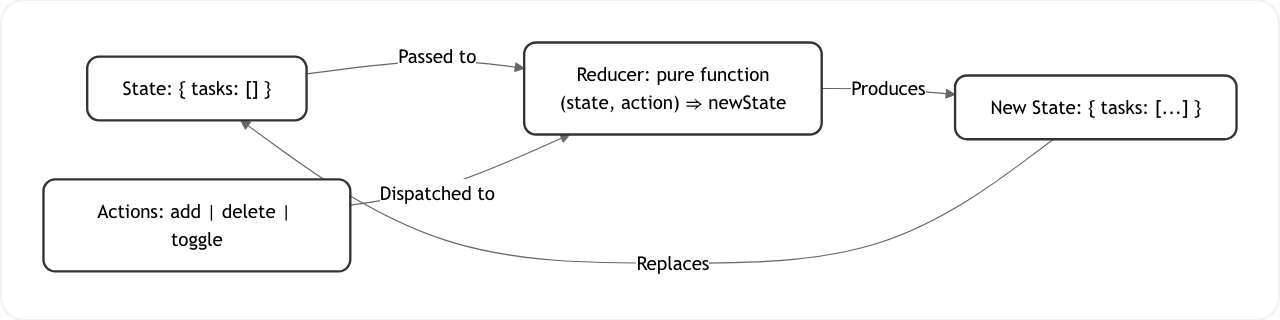
function tasksReducer(state, action) {
  switch (action.type) {
    case 'add':
      return [...state, action.task];
    case 'delete':
      return state.filter(t => t.id !== action.id);
    case 'toggle':
      return state.map(t =>
        t.id === action.id ? { ...t, done: !t.done } : t
      );
    default:
      return state;
  }
}

function TaskList() {
  const [tasks, dispatch] = useReducer(tasksReducer, []);

  return (
    <div>
      <button onClick={() => dispatch({
        type: 'add',
        task: { id: Date.now(), text: 'New task', done: false }
      })}>
        Add Task
      </button>
      {tasks.map(task => (
        <div key={task.id}>
          <span>{task.text}</span>
          <button onClick={() => dispatch({ type: 'toggle', id: task.id })}>
            Toggle
          </button>
        </div>
      ))}
    </div>
  );
}
the reducer is a pure function, meaning it always returns the same result for the same inputs. this makes it easy to test without mounting any component.
anti-pattern: boolean soup
as features grow, it's tempting to add one flag per condition:
// ❌ anti-pattern: boolean soup
const [isLoading, setIsLoading] = useState(false);
const [isError, setIsError] = useState(false);
const [isSuccess, setIsSuccess] = useState(false);
const [data, setData] = useState(null);

// what does isLoading=false, isError=false, data=null mean? Idle? Loading? Unknown?
// what if isError and isSuccess are both true?
// impossible states become possible.
pattern: discriminated unions (typestates)
model state as what the component is doing right now, not a collection of flags.
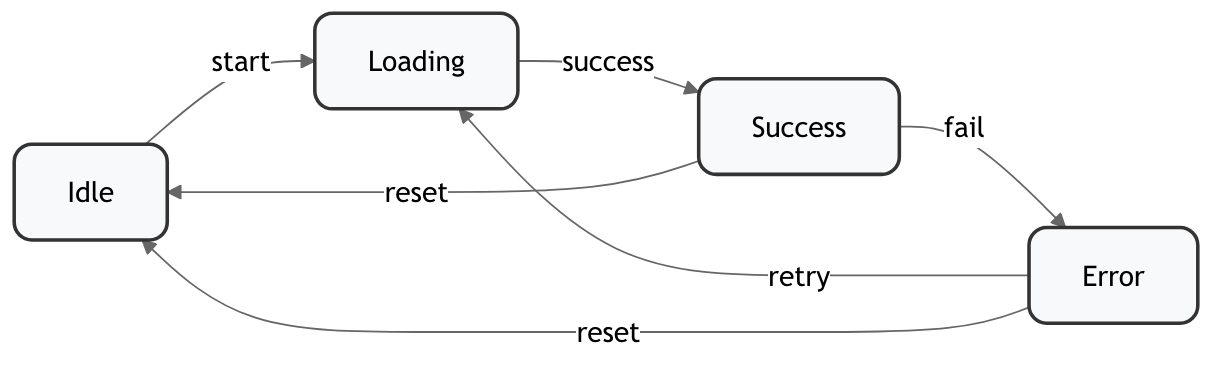
// ✅ pattern: explicit states with discriminated unions
type DataState<T> =
  | { status: 'idle' }
  | { status: 'loading' }
  | { status: 'success'; data: T }
  | { status: 'error'; error: string };

function useData<T>(fetchFn: () => Promise<T>) {
  const [state, setState] = useState<DataState<T>>({ status: 'idle' });

  const fetch = async () => {
    setState({ status: 'loading' });
    try {
      const data = await fetchFn();
      setState({ status: 'success', data });
    } catch (error) {
      setState({ status: 'error', error: error.message });
    }
  };

  return { state, fetch };
}

// TypeScript now guarantees data exists in the success branch
function UserProfile() {
  const { state, fetch } = useData(fetchUser);

  if (state.status === 'loading') return <Spinner />;
  if (state.status === 'error') return <Error message={state.error} />;
  if (state.status === 'success') return <Profile user={state.data} />;
  return <button onClick={fetch}>Load Profile</button>;
}
benefits: impossible states become impossible at compile time, render logic is exhaustive and clear, no isLoading && !isError && data !== null chains.
pattern: event-driven state with useReducer
when dealing with async actions, think about why data changes (events), not when (reactions). the status itself drives which async work to kick off.
idle
 ↓ searchStarted
searchingFlights
 ↓ flightsLoaded
selectingFlight
 ↓ flightSelected
searchingHotels
 ↓ hotelsLoaded
selectingHotel
// ✅ pattern: event-driven with useReducer
type BookingAction =
| { type: 'searchStarted'; destination: string }
| { type: 'flightsLoaded'; flights: Flight[] }
| { type: 'flightSelected'; flight: Flight }
| { type: 'hotelsLoaded'; hotels: Hotel[] };
type BookingState =
| { status: 'idle' }
| { status: 'searchingFlights'; destination: string }
| { status: 'selectingFlight'; flights: Flight[] }
| { status: 'searchingHotels'; selectedFlight: Flight }
| { status: 'selectingHotel'; selectedFlight: Flight; hotels: Hotel[] };
function bookingReducer(state: BookingState, action: BookingAction): BookingState {
switch (action.type) {
case 'searchStarted':
return { status: 'searchingFlights', destination: action.destination };
case 'flightsLoaded':
return { status: 'selectingFlight', flights: action.flights };
case 'flightSelected':
return { status: 'searchingHotels', selectedFlight: action.flight };
case 'hotelsLoaded':
if (state.status !== 'searchingHotels') return state;
return { status: 'selectingHotel', selectedFlight: state.selectedFlight, hotels: action.hotels };
}
}
export default function BookingFlow() {
const [state, dispatch] = useReducer(bookingReducer, { status: 'idle' });
// One effect, driven by status — not chained flags
useEffect(() => {
if (state.status === 'searchingFlights') {
searchFlights(state.destination)
.then(flights => dispatch({ type: 'flightsLoaded', flights }));
}
if (state.status === 'searchingHotels') {
searchHotels(state.selectedFlight)
.then(hotels => dispatch({ type: 'hotelsLoaded', hotels }));
}
}, [state.status]);
const handleSearch = (destination: string) => {
if (destination.trim()) dispatch({ type: 'searchStarted', destination });
};
// render based on status
if (state.status === 'idle') return <SearchForm onSearch={handleSearch} />;
if (state.status === 'searchingFlights') return <Spinner />;
if (state.status === 'selectingFlight') return <FlightList flights={state.flights} />;
// ...
}benefits: single source of truth, predictable transitions, no race conditions, testable reducer logic.
common useReducer mistakes
- overusing it for simple cases, a single toggle doesn't need a reducer
- → add the boilerplate only when multiple actions interact
- mutating state directly,
state.push(item)silently breaks React- → always return new objects/arrays
- putting side effects in the reducer, reducers must be pure
- → async work belongs in
useEffector event handlers
- → async work belongs in
case 3 - state shared across a feature
scenario: multiple components in a subtree need access to the same data like a theme, a user's login info, or the booking state from case 2. passing props down three levels starts to feel wrong.
<App>
  └── <BookingProvider>        ← state lives here
        ├── <SearchBar />      ← reads destination
        ├── <FlightList />     ← reads flights, dispatches flightSelected
        └── <Summary />        ← reads selectedFlight + selectedHotel
the right tool: Context API
Context solves prop drilling.
// 1. create the context
const ThemeContext = createContext(null);

// 2. provide it high in the tree
function ThemeProvider({ children }) {
  const [theme, setTheme] = useState('light');
  return (
    <ThemeContext.Provider value={{ theme, setTheme }}>
      {children}
    </ThemeContext.Provider>
  );
}

// 3. always expose via a custom hook and never use useContext directly in components
function useTheme() {
  const context = useContext(ThemeContext);
  if (!context) throw new Error('useTheme must be used within ThemeProvider');
  return context;
}

// 4. consume anywhere in the subtree
function Button() {
  const { theme, setTheme } = useTheme();
  return (
    <button
      style={{ background: theme === 'dark' ? 'black' : 'white' }}
      onClick={() => setTheme(theme === 'dark' ? 'light' : 'dark')}
    >
      Toggle Theme
    </button>
  );
}
the custom hook wrapper accomplishes two things: it validates usage (clear error if used outside the provider) and it hides the Context implementation detail from consumers.
pattern: Context + useReducer for complex shared state
for anything beyond simple flags, pair Context with useReducer. the reducer owns all the transition logic and Context just distributes it.
const BookingContext = createContext(null);

function BookingProvider({ children }) {
  const [state, dispatch] = useReducer(bookingReducer, { status: 'idle' });

  useEffect(() => {
    if (state.status === 'searchingFlights') {
      searchFlights(state.criteria)
        .then(flights => dispatch({ type: 'flightsLoaded', flights }));
    }
  }, [state.status]);

  return (
    <BookingContext.Provider value={{ state, dispatch }}>
      {children}
    </BookingContext.Provider>
  );
}

function useBooking() {
  const context = useContext(BookingContext);
  if (!context) throw new Error('useBooking requires BookingProvider');
  return context;
}
pattern: split contexts by update frequency
Context re-renders every consumer whenever its value changes. if you bundle slow-changing data (user info) with fast-changing data (form inputs) in one context, every form keystroke re-renders your entire navigation.
{/* ❌ anti-pattern: one context for everything */}
<AppContext.Provider value={{ user, theme, cartCount, searchTerm }}>

{/* ✅ Pattern: split by how often each piece changes */}
<UserContext.Provider value={user}>           {/* changes: on login */}
  <ThemeContext.Provider value={theme}>       {/* changes: on toggle */}
    <CartContext.Provider value={cartCount}>  {/* changes: on add/remove */}
common Context mistakes
- Provider hell, too many nested providers. consolidate related providers into a single
<AppProviders>wrapper - overuse, local component state doesn't belong in Context. it hurts modularity and makes components harder to reuse
- missing the custom hook, consumers that call
useContextdirectly have no error message if they're outside the provider - performance blind spot, if many components consume a context that updates frequently, reach for a global store instead
case 4 - app-wide global state
scenario: auth status, a shopping cart, feature flags or any state that's needed everywhere, updated frequently, or both. in this case, Context starts causing performance issues.
when to reach for a library
- Context is causing unnecessary re-renders across unrelated subtrees
- you need fine-grained subscriptions ("only re-render when this slice changes")
- DevTools, time-travel debugging, or middleware are required
- the team already has a standard
don't use global state for: local component state, remote/server data, or URL state. each of those has better-suited tools.
Zustand: lightweight and direct
Zustand is a minimal store with no providers, no boilerplate, just a hook.
import { create } from 'zustand';

const useStore = create((set) => ({
  count: 0,
  items: [],
  increment: () => set((state) => ({ count: state.count + 1 })),
  addItem: (item) => set((state) => ({ items: [...state.items, item] })),
  reset: () => set({ count: 0, items: [] }),
}));

function Counter() {
  // subscribe to specific slices, only re-renders when count changes
  const count = useStore((state) => state.count);
  const increment = useStore((state) => state.increment);

  return <button onClick={increment}>{count}</button>;
}
always subscribe to slices, never the whole store object. useStore(s => s) re-renders on every store update regardless of what changed.
good fit for: feature flags, shopping carts, global UI state, user preferences, small-to-medium apps.
Redux Toolkit: enterprise scale
Redux Toolkit (RTK) is the modern way to use Redux. it eliminates the old boilerplate via createSlice and uses Immer under the hood, so you can write "mutating" update logic safely.
import { configureStore, createSlice } from '@reduxjs/toolkit';
import { useSelector, useDispatch } from 'react-redux';

const counterSlice = createSlice({
  name: 'counter',
  initialState: { value: 0 },
  reducers: {
    increment: (state) => { state.value += 1; }, // Immer makes this safe
    incrementByAmount: (state, action) => { state.value += action.payload; },
  },
});

const store = configureStore({
  reducer: { counter: counterSlice.reducer },
});

function Counter() {
  const count = useSelector((state) => state.counter.value);
  const dispatch = useDispatch();
  return (
    <button onClick={() => dispatch(counterSlice.actions.increment())}>
      {count}
    </button>
  );
}
good fit for: role-based UIs, audit trails, time-travel debugging requirements, large teams with existing Redux standards.
anti-pattern: monolithic stores
don't dump everything into one store. group state by domain.
// ❌ anti-pattern: one store with unrelated state
const useStore = create(() => ({
  user: null,
  cartItems: [],
  searchFilters: {},
  uiTheme: 'light',
  wsConnection: null,
}));

// ✅ pattern: separate stores by domain
const useAuthStore = create(() => ({ user: null }));
const useCartStore = create(() => ({ items: [] }));
const useUIStore = create(() => ({ theme: 'light' }));
pattern: normalize nested data
when storing relational data in any store (global or local), flat is better than nested.
nested structure, updating one todo requires O(n×m) spread operations:

destinations: [
  { id: 1, name: 'Paris', todos: [{ id: 101, text: '...' }, ...] },
  ...
]
normalized structure, O(1) lookup and update:
destinations: { 1: { id: 1, name: 'Paris', todoIds: [101, 102] } }
todos: { 101: { id: 101, text: '...', destinationId: 1 } }// ✅ Pattern: normalized state
const state = {
destinations: {
1: { id: 1, name: 'Paris', todoIds: [101, 102] },
2: { id: 2, name: 'Tokyo', todoIds: [201] },
},
todos: {
101: { id: 101, text: 'Visit Eiffel Tower', done: false, destinationId: 1 },
102: { id: 102, text: 'Louvre Museum', done: true, destinationId: 1 },
201: { id: 201, text: 'Try sushi', done: false, destinationId: 2 },
}
};
// O(1) delete — no nested map required
function deleteTodo(todoId) {
const { [todoId]: deleted, ...restTodos } = state.todos;
return {
...state,
todos: restTodos,
destinations: {
...state.destinations,
[deleted.destinationId]: {
...state.destinations[deleted.destinationId],
todoIds: state.destinations[deleted.destinationId].todoIds.filter(id => id !== todoId)
}
}
};
}case 5 — remote / server state
scenario: you need to fetch a list of users, products, or posts from an API. you find yourself writing isLoading, isError, data, and a useEffect that re-fetches when filters change. then you want caching. then pagination. then optimistic updates.
the problem with storing server data in state
server data is fundamentally different from client state:
- it lives somewhere else and can become stale
- multiple components may independently request the same data
- it needs loading, error, and refetch lifecycle management
- mutations need to invalidate caches
storing API responses in Redux or Zustand recreates all this infrastructure manually and badly.
the right tool: TanStack Query
TanStack Query (formerly React Query) is purpose-built for remote state. it handles caching, background refetching, deduplication, and loading/error states automatically.
import { useQuery, useMutation, useQueryClient } from '@tanstack/react-query';

// fetching
function Users() {
  const { data, isLoading, error } = useQuery({
    queryKey: ['users'],
    queryFn: fetchUsers,
    staleTime: 5 * 60 * 1000, // treat as fresh for 5 minutes
  });

  if (isLoading) return <Spinner />;
  if (error) return <Error message={error.message} />;

  return <ul>{data.map(user => <li key={user.id}>{user.name}</li>)}</ul>;
}

// mutations
function AddUser() {
  const queryClient = useQueryClient();

  const mutation = useMutation({
    mutationFn: createUser,
    onSuccess: () => {
      // invalidate the cache — next read will refetch fresh data
      queryClient.invalidateQueries({ queryKey: ['users'] });
    },
  });

  return (
    <button onClick={() => mutation.mutate({ name: 'New User' })}>
      {mutation.isPending ? 'Adding...' : 'Add User'}
    </button>
  );
}
the queryKey acts as a cache key. components anywhere in the tree requesting ['users'] share the same cached response so no duplicate network requests.
benefits: automatic caching and background refetching, request deduplication, loading/error states out of the box, optimistic update support, pagination helpers.
pattern: subscribe to external stores with useSyncExternalStore
for non-React data sources like browser APIs, third-party libraries, WebSocket connections, useSyncExternalStore is the correct integration point. it handles concurrent rendering and SSR hydration safely.
import { useSyncExternalStore } from 'react';

function useOnlineStatus() {
  return useSyncExternalStore(
    // 1. subscribe: return cleanup function
    (callback) => {
      window.addEventListener('online', callback);
      window.addEventListener('offline', callback);
      return () => {
        window.removeEventListener('online', callback);
        window.removeEventListener('offline', callback);
      };
    },
    // 2. get current snapshot (client)
    () => navigator.onLine,
    // 3. get server snapshot (SSR)
    () => true
  );
}

function NetworkStatus() {
  const isOnline = useOnlineStatus();
  return <div>{isOnline ? '🟢 Online' : '🔴 Offline'}</div>;
}
use for: browser APIs (online status, window size, geolocation), WebSocket streams, third-party observable stores.
case 6 — a feature with URL state
scenario: you have a product search page with filters, sorting, and pagination. a user applies filters, then shares the link with a colleague who lands on a blank, unfiltered page. the filter state lived in useState and died when the URL was copied.
when state belongs in the URL
ask: should this state survive a page refresh? should users be able to share or bookmark it?
✅ put in URL: search query, active filters, sort order, current page, active tab
❌ keep in state: hover states, modal open/close, unsaved form input mid-edit
the right tool: nuqs
nuqs gives you a useState-like API that reads from and writes to URL query parameters, with type safety and SSR support.
import { useQueryState, parseAsString, parseAsInteger } from 'nuqs';

function ProductSearch() {
  const [search, setSearch] = useQueryState('q', parseAsString.withDefault(''));
  const [page, setPage] = useQueryState('page', parseAsInteger.withDefault(1));
  const [sort, setSort] = useQueryState('sort', parseAsString.withDefault('name'));

  return (
    <div>
      <input
        value={search}
        onChange={(e) => setSearch(e.target.value)}
        placeholder="Search..."
      />
      <select value={sort} onChange={(e) => setSort(e.target.value)}>
        <option value="name">Name</option>
        <option value="price">Price</option>
      </select>
      <Pagination page={page} onPageChange={setPage} />
    </div>
  );
}
// URL: /products?q=paris&sort=price&page=2
The URL is now the source of truth. Share it, bookmark it, refresh it — the state is always there.
benefits: type-safe parsers and serializers, SSR-compatible, shallow routing (no full page reload), default value handling, validation built in.
choosing the right tool
work through these questions in order:
does only this component need it?
├── yes → useState / useReducer
└── no ↓

is it API / server data?
├── yes → TanStack Query
└── no ↓

should it survive page refresh / be shareable?
├── yes → URL state (nuqs)
└── no ↓

do nearby components need it (same subtree)?
├── yes → lift state + Context
└── no ↓

is it needed app-wide with high update frequency?
├── simple → Zustand
└── complex / enterprise → Redux Toolkit
quick reference:
| State type | Tool | Why |
|---|---|---|
| UI toggle, counter | useState |
local, no sharing |
| complex local form / flow | useReducer |
multiple related updates |
| avoid prop drilling | Context | moderate sharing, low-frequency updates |
| app-wide, high frequency | Zustand | fine-grained subscriptions, no boilerplate |
| enterprise / DevTools | Redux Toolkit | time-travel, middleware, team standards |
| API data | TanStack Query | caching, loading states, deduplication |
| search filters, pagination | nuqs |
shareable, bookmarkable, persists on refresh |
| non-rendering values | useRef |
no re-render needed |
| external store integration | useSyncExternalStore |
browser APIs, third-party libraries |
testing state logic
the best side effect of using reducers and derived state: pure functions are easy to test.
// ✅ test the reducer directly. no DOM, no mocking, fast
describe('booking reducer', () => {
  test('selects flight and moves to hotel step', () => {
    const state = { status: 'selectingFlight', flights: [{ id: 1, price: 500 }] };
    const action = { type: 'flightSelected', flight: { id: 1, price: 500 } };
    const next = bookingReducer(state, action);

    expect(next.status).toBe('searchingHotels');
    expect(next.selectedFlight).toEqual({ id: 1, price: 500 });
  });

  test('prevents invalid transition from idle', () => {
    const state = { status: 'idle' };
    const action = { type: 'flightsLoaded', flights: [] };
    const next = bookingReducer(state, action);

    // reducer should guard against this — state unchanged
    expect(next.status).toBe('idle');
  });
});
keep UI tests (React Testing Library) for user-facing behaviour. keep reducer/selector tests for business logic. the split pays off as the app grows.
references
- Official React Docs: Managing State — structuring, reducers, context
- React State Management in 2025 — local, shared, global practices
- How to Use React Context Effectively — Kent C. Dodds
- Managing Global State with Context and useReducer
- State Management at Scale in React & Next.js — Frontend Masters